
WSL is a productive roommate with terrible desk habits. You install packages, pull Docker images, build projects, download datasets, and everything looks normal from inside Ubuntu. Then you return to Windows and discover that your C drive has quietly lost tens of gigabytes. The stranger part: after deleting large files inside WSL, Windows may still report that the space is gone.
That is why a WSL disk cleanup tool still matters in 2026. WSL 2 stores the Linux filesystem inside a dynamically expanding virtual disk, usually named ext4.vhdx. It grows when Linux needs room, but it does not always shrink just because you deleted files. Microsoft’s own WSL disk space documentation treats resizing, locating the VHD, and compacting virtual disks as separate maintenance tasks.
Several user comments form a useful little field report. User v says they use PowerShell and DiskPart to select the WSL disk and compact it. User J says ChatGPT recommended the same direction because deleting large files inside WSL does not automatically shrink the virtual disk. User L says Gemini pushed them toward the same kind of tool. User p says they have long used WizTree. User k finds it similar to WinDirStat, but more direct about file sizes. User N adds that WizTree is fast because it uses NTFS filesystem characteristics and can replace WinDirStat for this job.
The comments are not a single perfect recipe, but they reveal the real shape of the problem:
- First, find out what is taking space.
- Then decide what can be deleted safely.
- Finally, make the WSL virtual disk give released space back to Windows.
Skip the third step and you have cleaned the room but left the trash bag by the door.
WinDirStat: Slower, Open, Easy to Trust#
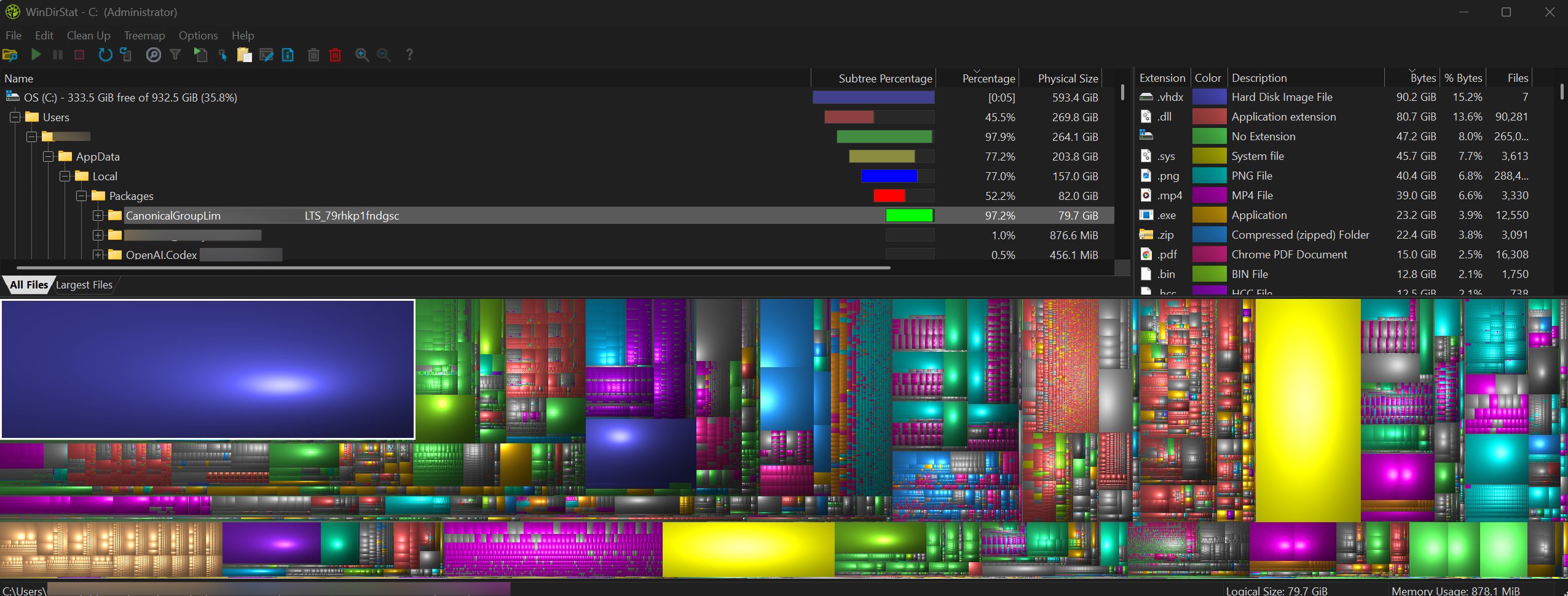
The image below shows a real WinDirStat cleanup session. The extension list shows .vhdx files taking 90.2 GiB. The directory path on the left sits under Users > AppData > Local > Packages > CanonicalGroupLimited..., which is where a Microsoft Store WSL distribution such as Ubuntu commonly stores its local state. In plain English: this is not mysterious Windows junk. The WSL virtual disk has grown large.
WinDirStat is strong because it is visual and honest. The upper pane gives you the path, and the treemap makes giant files impossible to ignore. It is free and open source, with code available on GitHub under GPL-2.0. For trust, download it from the official site or GitHub releases.
The tradeoff is speed. On large drives, WinDirStat can take a while, and the interface still has the durable charm of old Windows utilities. That is not fatal. A disk analyzer does not need to be fashionable; it needs to tell you where the 90 GB went.
WizTree: Much Faster, But Not Open Source#
Several commenters recommend WizTree, and there is a reason. WizTree is very fast on NTFS volumes because it can read filesystem metadata instead of slowly walking every directory in the usual way. For developers, that speed is addictive. By the time you suspect your C drive is bloated, WizTree has already ranked the suspects.
The licensing detail matters. WizTree is not open source. According to its official site, it is free for personal use, while commercial or business use requires a paid license. Trust-wise, it is a known Windows utility, but you should download it only from diskanalyzer.com, not from repackaged download portals.
So the recommendation is simple:
- Personal PC: WizTree is excellent for fast diagnosis.
- Work machine: check the license before installing it.
- Open source preference: use WinDirStat or another open source analyzer.
DiskPart: Built Into Windows, Powerful Enough to Respect#
The DiskPart method mentioned in the comments is not a third-party trick. DiskPart is built into Windows, and Microsoft documents the compact vdisk command for compacting dynamically expanding virtual hard disks.
A typical WSL flow looks like this:
wsl --shutdown
diskpart
select vdisk file="C:\Users\<you>\AppData\Local\Packages\<distro>\LocalState\ext4.vhdx"
attach vdisk readonly
compact vdisk
detach vdisk
exit
Important details:
- Run
wsl --shutdownfirst. Do not compact a running distribution’s disk. - Confirm the
ext4.vhdxpath. Guessing around disk tools is how bad afternoons begin. - Delete large files and caches inside WSL before compacting.
Optimize-VHDmay also work if the Hyper-V PowerShell module is available, but availability differs by Windows edition and feature setup.
DiskPart is free and trusted because it is a Microsoft system tool. It is also sharp. Use it with the documentation open, not from half-remembered command history.
A Practical 2026 WSL Cleanup Order#
First, check Linux-side usage:
du -h --max-depth=1 ~ | sort -h
sudo du -h --max-depth=1 /var | sort -h
docker system df
The usual heavy folders are Docker images and volumes, node_modules, package manager caches, build outputs, Python or Conda environments, datasets, logs, and temporary test files.
Second, remove what you actually understand:
sudo apt autoremove
sudo apt clean
docker system prune
Be careful with Docker prune options, especially -a and volume cleanup. Those are delete commands, not magic optimization switches.
Third, use WinDirStat or WizTree from Windows to confirm whether the .vhdx is still large. WinDirStat is slower but open source. WizTree is faster but closed source and personal-free/commercial-paid.
Fourth, shut down WSL and compact the virtual disk:
wsl --shutdownThen use DiskPart compact vdisk, or Optimize-VHD where available, following Microsoft documentation. This is the step that turns Linux-side deletion into Windows-side reclaimed space.
Which Tool Should You Recommend?#
For ordinary users, I would recommend WinDirStat first. It is free, open source, trustworthy, and easy to explain with screenshots. It is not the fastest tool, but it is transparent.
For developers who clean machines often, I would recommend WizTree plus DiskPart. WizTree finds the problem quickly; DiskPart shrinks the VHDX. Just remember the license for WizTree and the path discipline for DiskPart.
The clean mental model is this:
- WinDirStat/WizTree: show where the space is.
- WSL/Linux commands: remove the files you do not need.
- DiskPart/Optimize-VHD: make the virtual disk smaller on Windows.
WSL’s flaw is not that it uses disk space. Every serious development environment does. The problem is that it uses space quietly, behind a single large .vhdx file. A disk cleanup tool turns that black box back into a map.
Sources#
- Microsoft Learn: How to manage WSL disk space
- Microsoft Learn: compact vdisk
- WinDirStat: Official site and GitHub repository
- WizTree: Official site and commercial license page